Managed filtering sources
Threat, ad and tracker, parental-domain, and service controls can make a decision before a destination is reached.
QueryWarden combines managed domain sources with profiles, service categories, schedules, Safe Search, and scoped custom rules. The result is a DNS filter whose decision belongs to a defined endpoint and policy—not an unexplained global blocklist.
Managed sources provide a practical protection baseline. QueryWarden then lets an account owner place devices into distinct profiles and make an exact, reviewable exception only where the requirement calls for one.
Each capability below reflects the current public product, with beta and compatibility limits called out separately.
Threat, ad and tracker, parental-domain, and service controls can make a decision before a destination is reached.
Different configured endpoints can use different protection, schedule, service, and privacy choices without sharing one public resolver credential.
Allow or block rules can be narrowed by hostname match, audience, and duration so a troubleshooting exception does not need to become permanent or account-wide.
When eligible evidence is retained, QueryWarden can separate the recorded historical decision from rules that match the hostname now.
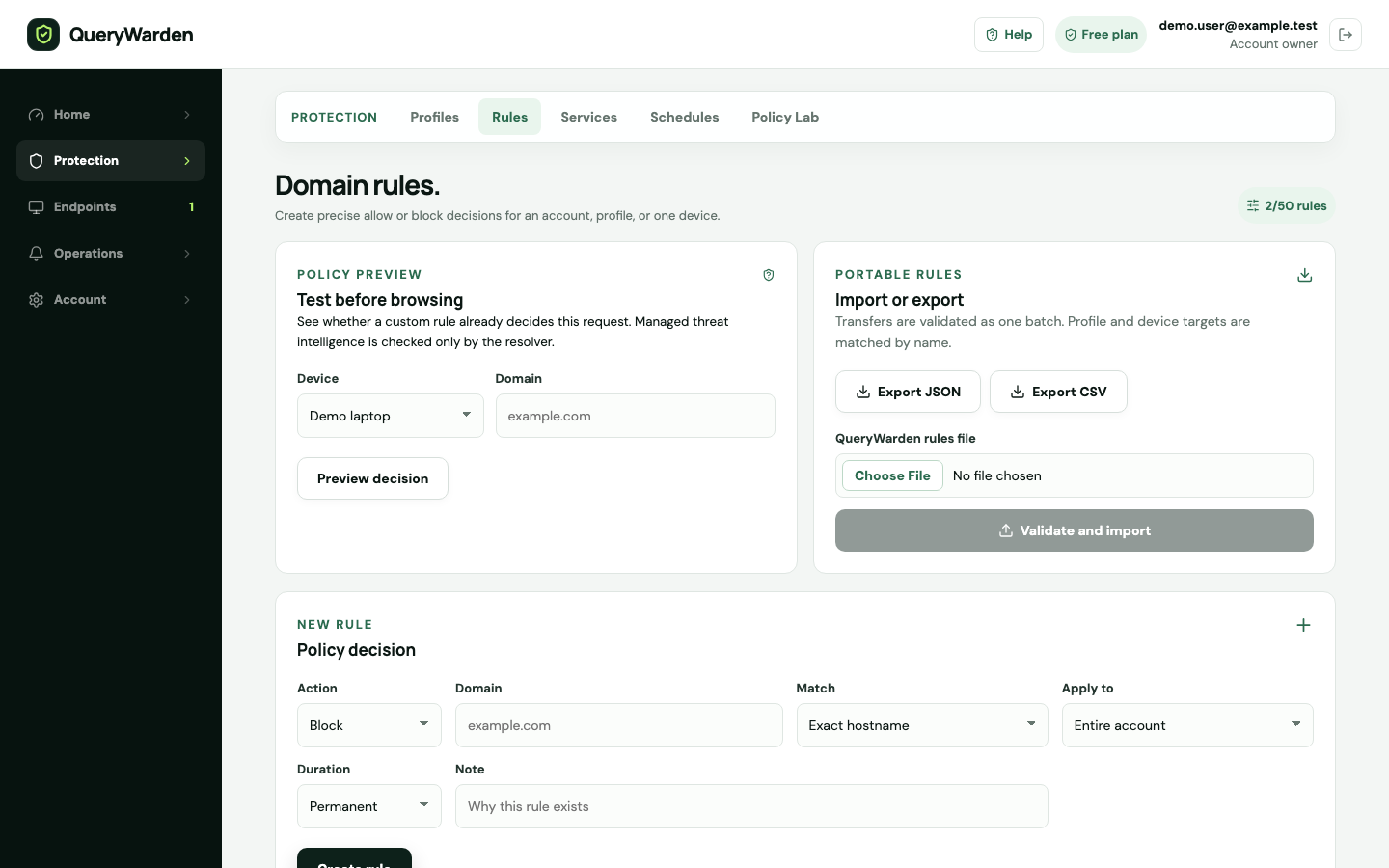
The Domain Rules workspace exposes the current decision, hostname match, audience, duration, and reason in one flow. That helps keep a narrow troubleshooting change from becoming an unexplained permanent override.
 Open full-size screenshot
 A preview shows whether managed protection, a service control, profile policy, or an existing custom rule already determines the result.
Exact and subdomain matches have different reach. Account, profile, or endpoint audience determines who receives the exception.
A temporary rule and recorded reason reduce the chance that a short investigation silently becomes permanent policy.
QueryWarden applies policy at the recursive DNS layer, before a supported client connects to the requested domain.
Enable the protection and service controls appropriate for the endpoints assigned to that profile.
Choose when scheduled controls apply and whether domain history is Full, Anonymized, or Off within the available plan window.
Inspect the effective decision and source, then choose the narrowest exact or subdomain match that solves the requirement.
Generate uncached activity through the intended endpoint and confirm the new result without assuming that successful browsing proves the configured resolver was used.
A clear rule model reduces accidental scope, but DNS still sees hostnames rather than the complete content or intent of a connection.
Published and reviewed by QueryWarden Engineering, Digiport OÜ. First-party review against the current public QueryWarden product, its documented deployment constraints, and the primary sources listed on this page. This is not an independent audit, certification, approval, or endorsement.
Product screenshots are deterministic captures of the current interface using synthetic accounts, devices, and reserved .test domains. External sources explain protocols and industry guidance; they do not verify QueryWarden implementation claims.
Last reviewed . Product availability can change; dashboard capability labels remain the source of truth. Review our Security & Trust disclosure.These primary sources support the general technical context. Citing them does not mean their publishers evaluated, approved, or endorsed QueryWarden.
Yes, when the account entitlement allows the required profiles and endpoints. Devices are assigned to profiles that carry their own protection, service, schedule, and privacy settings. Free currently includes one device and one profile.
Yes. A custom allow rule can be scoped to an exact hostname or a deliberate subdomain range, selected audience, and temporary or permanent duration. Review the security impact before saving it.
No. It can block requests to matching ad and tracker domains, but it cannot reliably remove content served from an allowed first-party hostname or repair the layout left by blocked content.
Create a Free account, connect one compatible endpoint, and verify the result before expanding the scope of any rule.